Billionaire Life DLC Feature Preview: Corporate Brand Override
Posted: Sat Aug 01, 2026 3:14 pm
New Feature: Corporate Brand Override
Branding in Capitalism Lab has always been all-or-nothing: pick Corporate Brand, Range Brand or Unique Brand, and it applies to your entire product line. That changes now. A company on Range Brand or Unique Brand can tag individual product classes or products to be branded under your Corporate Brand instead — a hybrid branding strategy, decided product by product. Tagged products share your corporate brand awareness, including the boost from Corporate Philanthropy and your PR department, while everything else keeps its own brand.
For the full details, please view the web page https://www.capitalismlab.com/corporate-brand-override/
The feature is on by default. It is controlled by a New Game setting: DLC → Billionaire Life DLC → Philanthropy → "Corporate Brand Override" (Yes by default). Set it to No if you prefer the classic single-strategy branding game.
What it does
How to use it
The three brand strategies (recap)
What changes when a product is tagged
Pooling is a double-edged sword, and that is intentional:
AI companies don't use the override — each AI picks a single brand strategy and sticks to it. This is a strategic option available to you alone.
Tips
Branding in Capitalism Lab has always been all-or-nothing: pick Corporate Brand, Range Brand or Unique Brand, and it applies to your entire product line. That changes now. A company on Range Brand or Unique Brand can tag individual product classes or products to be branded under your Corporate Brand instead — a hybrid branding strategy, decided product by product. Tagged products share your corporate brand awareness, including the boost from Corporate Philanthropy and your PR department, while everything else keeps its own brand.
For the full details, please view the web page https://www.capitalismlab.com/corporate-brand-override/
The feature is on by default. It is controlled by a New Game setting: DLC → Billionaire Life DLC → Philanthropy → "Corporate Brand Override" (Yes by default). Set it to No if you prefer the classic single-strategy branding game.
What it does
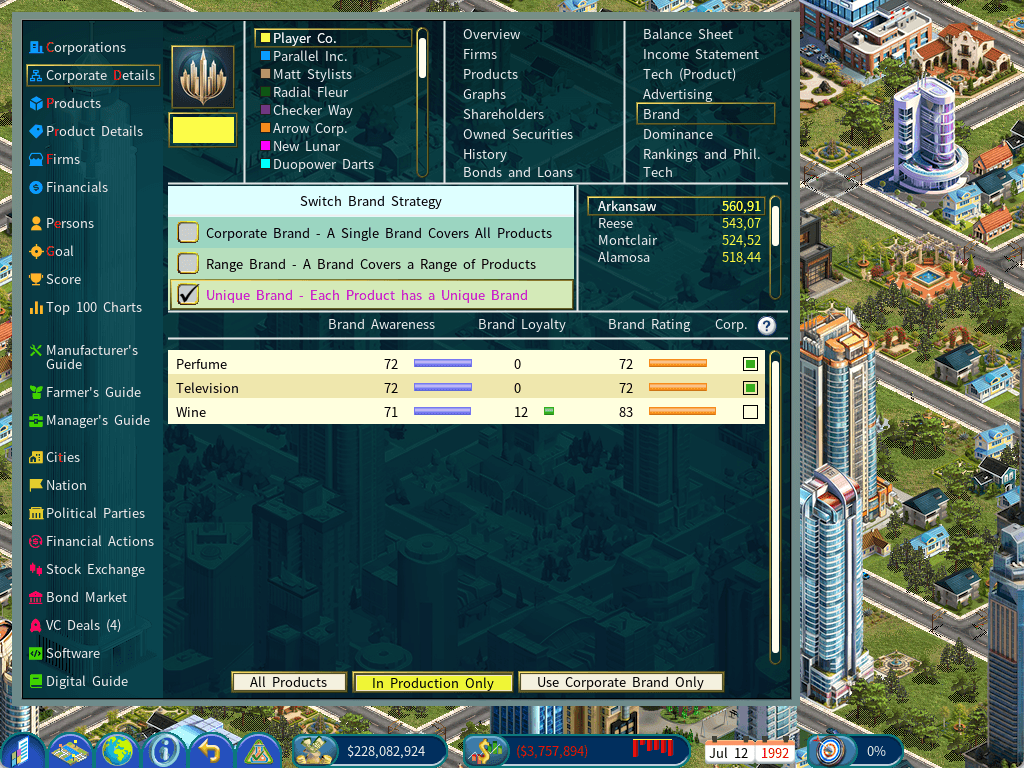
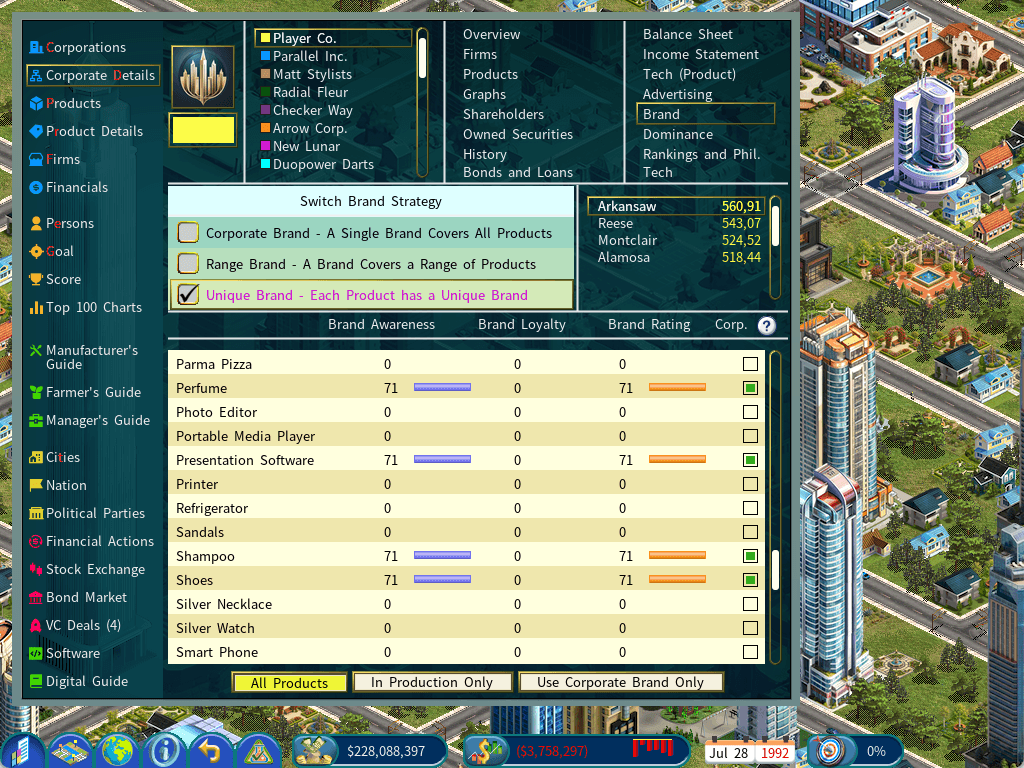
- On the Brand tab of your Corporate Details report, a new "Corp." column appears on the far right, with a small box on every row. Click it to tag or untag that product class (Range Brand) or product (Unique Brand) — a green square marks a tagged row.
- A tagged product behaves exactly as if your company were on Corporate Brand for that line: it reads your corporate brand awareness, gets the Corporate Philanthropy and PR department boosts, and advertising it builds the corporate brand — lifting every tagged product at once.
- The rest of your catalogue is untouched — untagged products keep building their own separate brands, as normal for Range/Unique Brand.
- When you tag a row, its Awareness, Loyalty and Brand Rating figures switch immediately to the corporate values.
How to use it
- Open the Corporate Details report of a company you control.
- Go to the Brand tab. Your brand strategy must be Range Brand or Unique Brand (on Corporate Brand everything is already corporate, so there is nothing to override).
- Click the box in the "Corp." column on any row to tag it. If the product has already built up its own brand, a "Reset Brand?" confirmation warns you first: "Changing this product's Use Corporate Brand setting will reset its own brand awareness and loyalty to zero in every city. This cannot be undone." — choose Proceed or Cancel (there's a "Don't show this message again." checkbox if you're sure — it's remembered for the rest of the current game, and a new game asks again).
- Use the three-way filter at the bottom of the list to choose which rows are shown — see the table below. All Products mode is the key one: it lists products you don't make yet (rows with zero bars are expected), so you can pre-tag a product before you launch or advertise it.
Code: Select all
List mode                  What it lists                                  Use it for
--------------------------------------------------------------------------------------------
All Products               Every consumer product enabled in this        Pre-tagging a product
                           game, whether or not you make it              before launch
In Production Only         Only the products your company currently      Day-to-day brand
(default)                  produces                                      management
Use Corporate Brand Only   Only the products you have already tagged     Reviewing the corporate
                                                                         pool at a glance
Code: Select all
Strategy          How brands are kept                       Override available?
--------------------------------------------------------------------------------------
Corporate Brand   One umbrella brand covers every product   Not needed - already corporate
Range Brand       One brand per product class               Yes - tag individual classes
Unique Brand      A separate brand for every product        Yes - tag individual products
Code: Select all
Aspect                   Untagged (Range / Unique)      Tagged (Corporate Brand)
----------------------------------------------------------------------------------
Brand awareness source   Its own class/product brand    Your corporate brand awareness
Corporate Philanthropy   No effect on this product      Applies
PR department boost      No effect on this product      Applies
Advertising builds       That product's own brand       The corporate brand - lifting
                                                        every tagged product at once
Brand loyalty            Its own loyalty pool           The shared corporate pool, incl.
                                                        the umbrella dilution penalty
- Upside — one advertising campaign lifts all your tagged products, and Corporate Philanthropy plus PR pour into the same pool.
- Downside — tagged products share loyalty. A quality problem on one drags down the corporate brand, and with it every other tagged product. And as with a full Corporate Brand company, the corporate brand's loyalty is diluted the more product lines share the name — only your tagged products count toward that dilution, so a small, focused pool is penalised less than a sprawling one.
- Tagging or untagging resets the product's own brand. Either way, the class/product's separate brand awareness and loyalty are wiped to zero in every city — tagged, it reads the corporate brand instead; untagged, it restarts its own brand from scratch. The corporate pool is not reduced while other products are still tagged. Don't flip tags casually.
- Untag the last product and the pool is wiped. When no products remain tagged, the shared corporate pool is cleared — so a later re-tag starts from a clean corporate brand instead of inheriting the numbers left by the products you had tagged before.
- Changing brand strategy clears every tag. Range tags classes and Unique tags individual products, so overrides can't carry across a strategy switch — and switching strategy resets all your brands anyway.
- No limit. Tag one product or all of them — tagging everything is simply Corporate Brand behaviour for those lines.
AI companies don't use the override — each AI picks a single brand strategy and sticks to it. This is a strategic option available to you alone.
Tips
- Pair it with philanthropy. The override is worth most when your Corporate Philanthropy score is high — otherwise you're pooling brands for little gain.
- Tag your flagship lines. Put your best, highest-quality products under the corporate name; keep risky or low-quality lines on their own brand so they can't poison the pool.
- Decide before you advertise. Use "All Products" mode to tag a line before launch, so every advertising dollar goes straight into the corporate brand instead of a brand you'll later abandon.
- Keep niches separate. Products aimed at very different customers often do better with their own identity — that's what Range/Unique Brand is for. Use the override selectively.
- Protect the pool. A quality slump on one tagged product hurts them all — watch quality on anything wearing the corporate name.